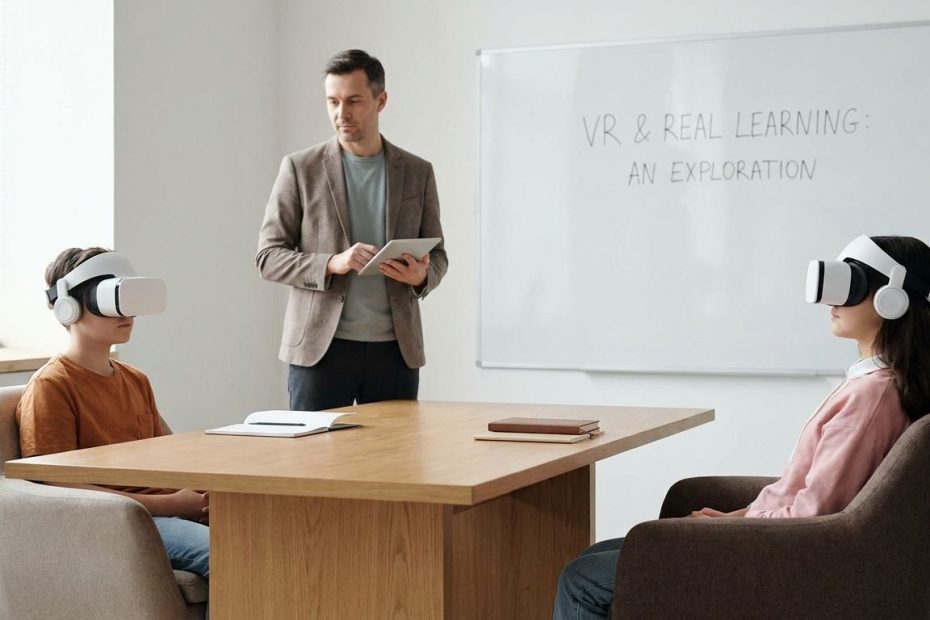
VR in classrooms is useful when it helps students experience something they can’t safely, affordably, or clearly study through books, videos, or discussion alone. It’s overhyped when schools buy headsets before defining the learning goal, teacher workflow, content quality, and safety plan.
You’re probably weighing two competing claims: Virtual Reality(VR) can make lessons more memorable, or it can become another expensive device cart that gathers dust. This article helps you separate proven classroom value from vendor excitement, so you can decide where VR belongs in a practical school technology plan.
What Are The Real Benefits Of Using VR In The Classroom?
VR works best when it turns abstract or inaccessible material into an experience students can inspect, repeat, and discuss. The strongest classroom uses involve 3D models, simulations, virtual field trips, practice spaces, and lessons where scale, motion, or place matters.
In Science, Technology, Engineering, and Mathematics(STEM), students can examine a cell, molecule, machine part, ecosystem, or engineering design from angles that a textbook can’t show. In history and geography, VR can place students inside a reconstructed site or environment, making location and sequence easier to understand. In career and technical education, students can practice steps in a controlled simulation before working with real tools or equipment. Those use cases give VR a real instructional job rather than a novelty role.
The benefit is not automatic engagement. Students may be excited by a headset the first time, but excitement fades if the activity has no learning task. A strong VR lesson asks students to observe, compare, predict, label, explain, or apply what they experienced afterward. The headset should feed the lesson, not replace the lesson.
Is VR In Classrooms Overhyped Or Essential?
VR in classrooms is not essential for every subject, grade, or unit. It becomes close to necessary only when it gives students access to an experience that would be unsafe, too costly, too rare, too small, too large, or too distant to study well through regular classroom methods.
The “overhyped” label fits when VR is treated as a universal upgrade. A worksheet in a headset is still a worksheet. A field trip video that students watch passively may not justify the cost, setup time, storage, sanitation, account management, and teacher training. If a laptop, physical model, classroom lab, or short video teaches the same idea faster and better, VR is the weaker choice.
The “essential” label fits a narrower set of lessons. Think hazardous labs, anatomy, astronomy, architecture, special equipment training, spatial geometry, environmental systems, and remote places students can’t visit. In those cases, VR can reduce barriers and give students repeatable practice. The correct question isn’t whether VR is good or bad; it’s whether the learning objective needs immersion.
Does VR Actually Improve Learning Outcomes?
Research suggests VR can improve learning outcomes, but the size of the gain depends on lesson design, subject matter, age group, content quality, and what VR is compared against. The evidence supports careful use, not blanket adoption.
A meta-analysis on elementary school VR found that students learning in virtual environments achieved higher learning scores than students in traditional classrooms, with a reported standard mean difference of 0.64. Another meta-analysis of immersive VR across Kindergarten through twelfth grade(K-12) and higher education found a positive overall effect on learning, with an effect size of g = 0.38. Those numbers point to real promise, especially for concepts that benefit from spatial understanding and active exploration.
You still need to read those findings with care. A short, well-designed VR simulation can outperform a weak lecture, but that doesn’t mean VR beats strong teaching, labs, discussion, writing, retrieval practice, or guided feedback. VR adds the most value when it’s paired with clear prompts, teacher facilitation, student reflection, and an assessment that checks understanding after the headset comes off. Learning gains come from instruction, not immersion alone.
How Much Does Implementing VR In Schools Cost?
The cost of classroom VR includes far more than headsets. You need to plan for devices, protective cases, charging, storage, cleaning, software licenses, content subscriptions, device management, repairs, replacement units, staff training, and classroom time.
Consumer headset prices give you a starting point. Meta announced Quest 3S starting at $299.99 and Quest 3 at $499.99, but a school rollout usually costs more than the shelf price. A classroom set may require mobile device management, teacher dashboards, headphones, carrying cases, controller replacements, extended warranties, charging carts, and paid learning content. If students share devices, you also need procedures for fit, sanitation, rotation, and supervision.
A practical budget starts with a pilot, not a districtwide purchase. Choose one department, a small group of teachers, and a handful of lessons where VR has a clear instructional advantage. Measure student understanding, teacher workload, device reliability, and actual lesson frequency. If the headsets are used twice and parked for months, the cost per useful lesson becomes hard to defend.
What Are The Main Challenges Of Classroom VR?
The biggest classroom VR problems are cost, setup time, teacher readiness, content quality, device management, student safety, and curriculum fit. These barriers are solvable, but they must be addressed before purchase.
Research on head-mounted displays(HMDs) in Kindergarten through twelfth grade(K-12) schools found challenges around economy and technology, initial learning barriers, classroom organization, curriculum alignment, expected learning outcomes, teacher competence, professional development, and trust. Another teacher readiness study found concerns centered on cost, technical issues, content availability, and pedagogical integration. Those findings match what schools often discover after the first few lessons: the device is only one part of the system.
Teacher workflow deserves special attention. A teacher managing thirty students can’t troubleshoot logins, tangled straps, low batteries, Wi-Fi problems, content loading, student discomfort, and behavior issues at the same time. Schools need a repeatable routine: preloaded content, clear roles, short use windows, casting to a screen, backup activities, and technical support. Without that routine, even good VR content becomes difficult to use.
Which Subjects Benefit Most From VR?
VR benefits subjects where students need to understand space, scale, sequence, process, or place. STEM, health sciences, geography, history, design, arts, and career training often have the clearest fit.
Science lessons can use VR to show invisible processes, tiny structures, large systems, or dangerous environments. Mathematics can use three-dimensional graphs, geometric solids, and spatial reasoning tasks. Career programs can use simulations for equipment familiarity, procedural rehearsal, or workplace safety training before students enter a real lab or shop. These are practical matches because VR makes the hard-to-see easier to inspect.
Humanities and arts can benefit too, but the lesson must move beyond spectacle. A history reconstruction should lead students to analyze evidence, compare interpretations, or explain cause and effect. An art or design lesson should ask students to critique form, scale, space, and technique. If students simply “look around,” the lesson may be memorable without being academically strong.
Is VR Safe For Children’s Eyes And Well-Being?
Current medical guidance does not show that brief, supervised VR use harms children’s vision, but long-term research is still limited. Schools should use reasonable time limits, adult supervision, breaks, content controls, and opt-out options for students who feel discomfort.
The American Academy of Pediatrics(AAP) notes that brief exposure has not been shown to cause harm in children, especially with supervision, but it also stresses that there is not yet a large body of safety data. The same guidance notes that the American Academy of Ophthalmology does not see reason to worry that VR headsets damage eye development, health, or function, though eye strain or fatigue can occur. Manufacturers often restrict use for younger children, so schools should follow device guidance and district policy.
Comfort matters in the classroom. Students may experience eye strain, dizziness, headache, disorientation, or motion sickness, especially during fast-moving scenes. Use seated or stationary activities when possible, keep sessions short, check fit, cast the teacher view to a screen, and stop immediately when a student reports discomfort. A safe VR program treats the headset like lab equipment: useful, supervised, and governed by clear rules.
How Should Teachers Get Trained To Use VR Effectively?
Teacher training should focus on lesson design, classroom management, safety routines, troubleshooting, and assessment. A one-time device demo is not enough.
Start with a simple planning question: What will students understand better after this VR activity than they would through a standard lesson? From there, teachers need to choose content, set a time limit, prepare vocabulary, design an observation task, and plan a debrief. The debrief is where much of the learning gets organized. Students need to explain what they noticed, connect it to the standard, and apply it to a question or task.
Training should include dry runs without students. Teachers need to know how to launch the app, reset the view, pair controllers, cast the screen, clean devices, handle a student who feels sick, and switch to a backup plan. The best early lessons are short and repeatable. Once teachers trust the routine, they can build richer activities with collaboration, student-created models, and assessment tasks.
How Should Schools Decide Whether VR Is Worth It?
A school should invest in VR only when the instructional use case, teacher readiness, student safety plan, content library, support model, and measurement plan are all in place. If any one of those pieces is missing, run a pilot before scaling.
Use a simple decision test. Does VR teach something students can’t learn as well through lower-cost tools? Does the lesson connect to a required standard or program goal? Can teachers run it without losing too much class time? Can the school support updates, storage, cleaning, and repairs? If the answer is weak, the purchase needs more planning.
Market growth alone should not drive the decision. The VR education market is projected to grow fast, with Fortune Business Insights reporting expansion from $17.18 billion to $65.55 billion and an 18.2% compound annual growth rate. That shows vendor investment and buyer interest, not guaranteed classroom success. Your school’s decision should rest on student learning, teacher capacity, and total cost of use.
When Is Classroom VR Worth It?
- Use VR for hard-to-see ideas
- Prioritize simulations and 3D models
- Train teachers before rollout
- Limit time and supervise students
- Skip VR when simpler tools work
Where VR Belongs In A Smart Classroom Plan
VR in classrooms is worth taking seriously, but it should earn its place lesson by lesson. Use it where immersion helps students inspect, practice, and remember ideas that are hard to teach through flat media. Avoid buying headsets for general excitement, because the real work is content selection, teacher training, device routines, and measuring whether students learned more. If you start small, review results, and expand only where VR improves teaching, it becomes a useful part of your education technology plan rather than an expensive distraction.
References
- Fortune Business Insights: Virtual Reality In Education Market
- Education Resources Information Center(ERIC): Effectiveness Of Virtual Reality In Elementary School
- ScienceDirect: The Potential Of Immersive Virtual Reality To Enhance Learning
- American Academy Of Pediatrics: Virtual Reality Use And Children
- Meta: New Education Product For Quest Devices
- Meta: Quest 3S Pricing Announcement
- Education Resources Information Center(ERIC): Challenges Of Using Head-Mounted Virtual Reality In Kindergarten Through Twelfth Grade Schools
- University Of Texas At Tyler Scholar Works: Teachers’ Readiness, Opportunities, And Challenges With Virtual Reality

Jeffrey Hammel is a chief financial officer in corporate finance with an MBA from Indiana University’s Kelley School of Business. He partners with boards and leadership teams on risk management, M&A integration, business planning, and growth—and is known for building trust-based, high-performance cultures.